DiRT 2, back in the driver's seat — this time in VR
I've been giving DiRT 2 a new excuse to stay installed: DiRT2VR, my experimental cockpit VR mod. It adds stereoscopic rendering and head tracking, keeps the original menus on a virtual screen, and comes with a Windows launcher for getting into a race without a pile of manual configuration. Somewhere along the way, it also picked up quick races, controller setup and LAN multiplayer.
It is still a work in progress, but the tested Quest 3 setup is already driving in VR. Here's a look at what it does, what the interface looks like, and the bits that still need work.
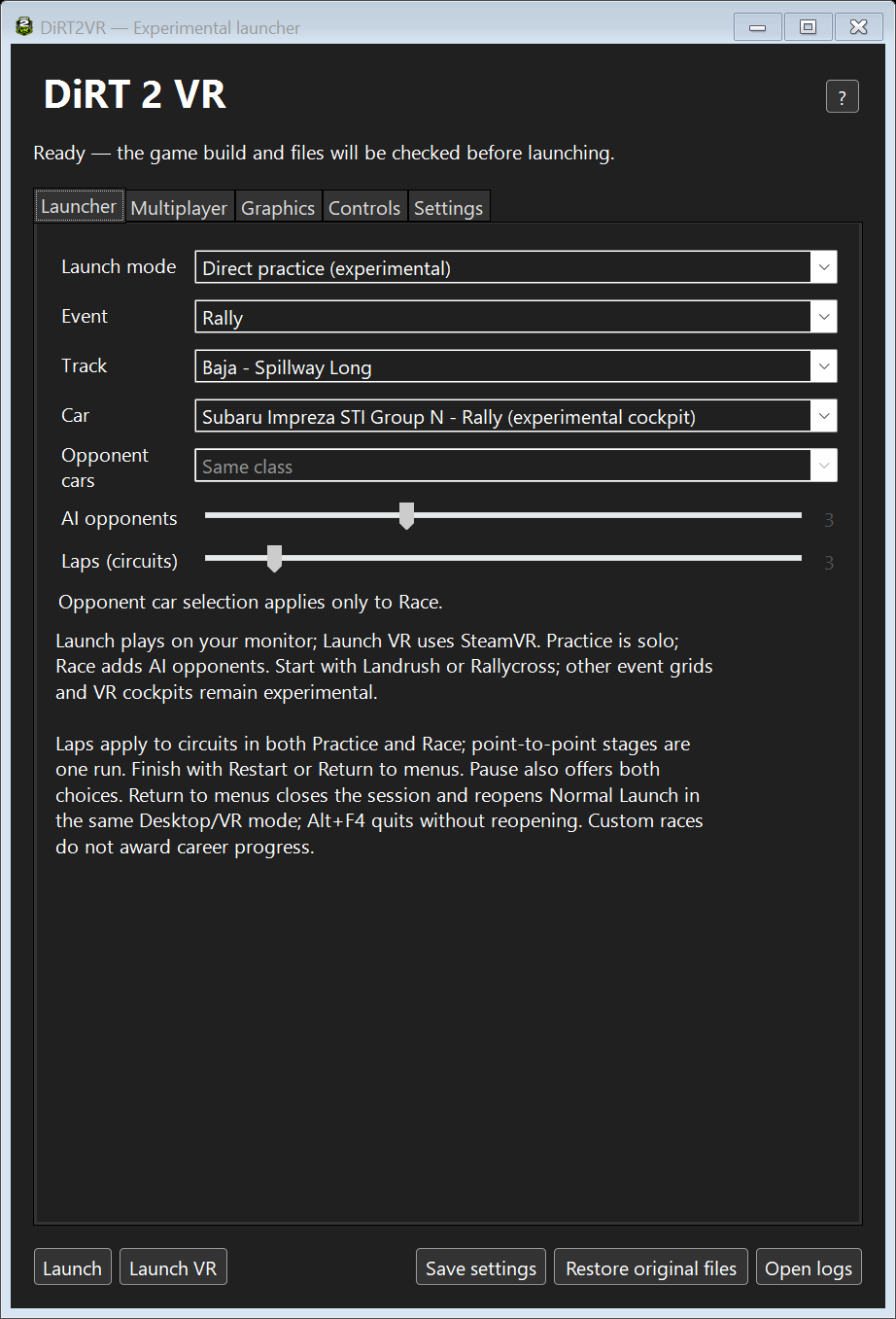
The DiRT2VR launcher: choose an event, track and car, then launch on the desktop or in VR. Shown in solo Direct practice mode; opponent controls apply to Race.
A little DiRT in the headset
The idea is simple: keep the driving game, put me in the cockpit, and let me look around. The mod renders separate views for the two eyes and uses head tracking for the cockpit view. The original menus live on a virtual screen, which is also where pause and options screens go; resuming brings back the selected cockpit VR mode.
Most of the hands-on headset testing so far has been on Quest 3 through SteamVR, primarily in the Subaru Impreza STI. This is a seated driving mod using the game's usual controls, not a motion-controller conversion. By default, F9 toggles cockpit VR and the virtual screen, and F10 recentres the view. Both actions can be rebound.
A launcher that does the boring bits
The main window separates ordinary Launch from Launch VR. Desktop play doesn't need SteamVR or a headset, and the launcher's VR graphics overrides stay out of it. Settings are saved for the next session, and the launcher minimises once the game starts.
Normal Launch takes you through the original game and its career. Direct practice lets you choose an event type, an installed track and a car for a solo run. Race adds between one and seven AI opponents, with the same car as you, a mixed grid, or cars from the same class. Circuit sessions have a one-to-twenty-lap setting; point-to-point stages remain a single run.
These quick sessions are for getting straight to the driving, not earning career rewards. They now have Restart and Return to menus choices instead of endlessly repeating. One slightly old-game-shaped wrinkle: Return to menus closes the direct session and reopens Normal Launch, so there is another loading sequence. Desktop practice and AI races have been tried at Baja; the wider range of combinations, especially crowded grids in VR, still needs testing.
Making it comfortable to look at
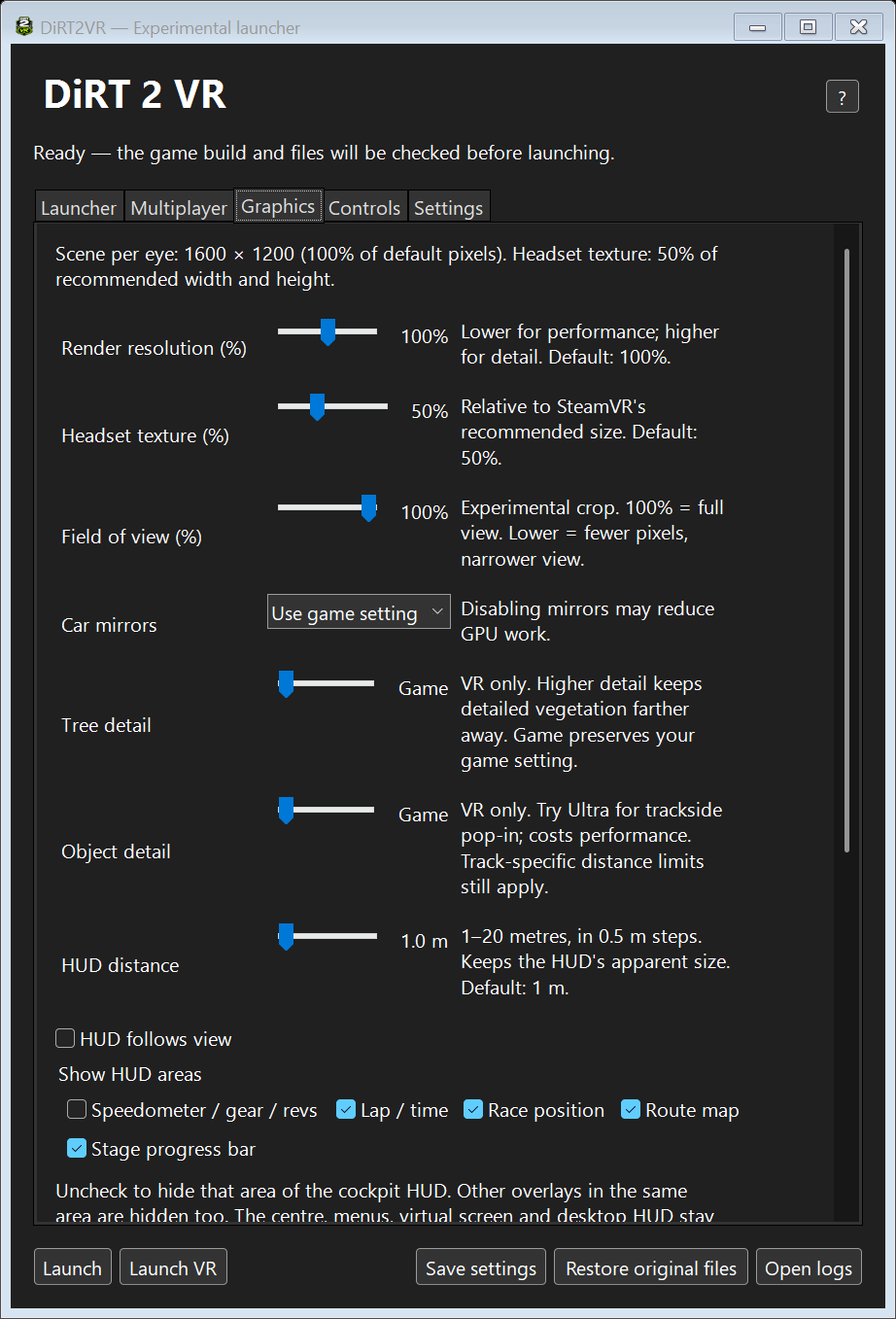
The Graphics tab puts the main VR adjustments in one place: scene render resolution, headset texture scale, field of view, mirrors, tree detail and trackside-object detail. There is also a cockpit HUD with a distance setting, an optional follow-your-head mode, and switches for the individual information areas.
The Graphics tab brings together VR resolution, scenery detail and cockpit HUD options. Individual settings still need broader headset testing.
Those two resolution sliders do different jobs. Rendering more detail in the game scene and allocating a larger headset texture are not interchangeable; turning up the latter alone won't invent detail that wasn't rendered. Headset refresh rate still belongs to SteamVR or the headset's connection software. There isn't a magic guaranteed-frame-rate slider, unfortunately.
A fair amount of recent work has been about things that look perfectly ordinary on a monitor and very wrong when each eye sees something different. Road rubble was fixed in the tested Novigrad scene, and the Ensenada Sprint puddles now use separately rendered reflections for each eye. That reflection fix has been checked in Quest 3. Other tracks and awkward viewing angles still need coverage.
Buttons, pedals and fewer guessing games
The Controls tab handles Toggle VR and Recenter shortcuts, including keyboard combinations and controller buttons. There is also a separate driving-controls editor for steering, pedals, handbrake, shifts, clutch and H-pattern gears. You can keep the game's bindings, use the Xbox preset, or step through the binding wizard.
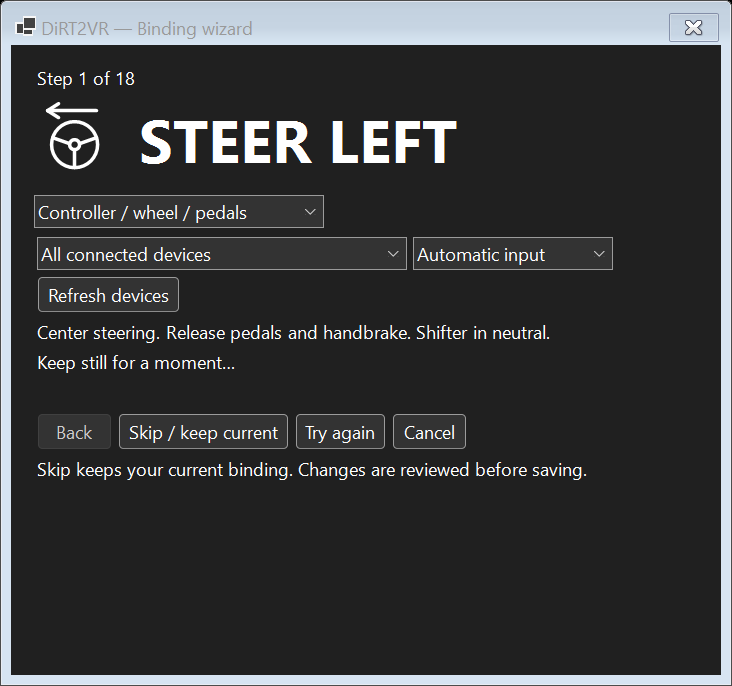
The driving-binding wizard works through one action at a time, with skip, retry and review before saving.
The wizard asks for one action at a time: centre everything, move the requested control, then release it before moving on. It can listen across separate wheel, pedal and shifter devices, and lets you skip actions or review the result before saving. Recent changes focus on noisy pedals, held switches and wheel drivers that report axes in unusual ways. Xbox-compatible input has been tested; physical Fanatec and Logitech acceptance is still outstanding, so I am not calling this universal wheel support yet.
And yes, some LAN racing too
Multiplayer now has its own tab, with a local server browser and HOST / JOIN buttons. Each launch asks whether you want Desktop or VR. It uses the normal DiRT 2 career rather than making you maintain a separate save, and both PCs need the matching current package.
The launcher finds the host and prepares the connection, but you still create and join the actual lobby through the game's Multiplayer / LAN menus. Two-PC desktop testing has made it through a Battersea race, the finish and the results screen. One particularly sneaky loading disconnect turned out to be the game objecting to modified startup-movie definitions, so LAN sessions now leave those intact. Multiplayer VR is available in the launcher but has not yet had its headset acceptance test.
Trying it out
At the time of writing, the published package is 0.12.5. Get the installer or full mod ZIP from the latest DiRT2VR release, not GitHub's source-code archive. You need Windows x64, your own working DiRT 2 1.1.0.0 installation with the supported executable, and a headset ready in SteamVR for VR play.
The package installs alongside the game; a second game copy isn't required. Open DiRT2VR normally, check the game and SteamVR paths in Settings, and start with Normal Launch and the tested Subaru cockpit. If another graphics mod already owns d3d11.dll, resolve that conflict first: the installer deliberately refuses to overwrite a foreign proxy.
Temporary camera, graphics and other session changes are backed up and restored after play. There is a Restore original files button for interrupted sessions, and the launcher checks for pending recovery before a new launch. Keep those backups if recovery reports a problem. The full README covers setup, controls and recovery, and the changelog has the detailed development trail.
Still experimental, still moving
This is not finished support for every headset, car and track. PSVR2 and the wider wheel range remain unverified. Some effects, including crowds, particles, shadows and motion blur, are reduced or disabled; occasional hitching remains, and the HUD's placement options need more headset testing. Seat adjustment, replay transitions and calibrated world scale also need work.
For now, it is a way to get back into DiRT 2 from a rather different seat, with a launcher that has grown into a useful little toolbox of its own. If you try it, useful feedback is wonderfully specific: headset, car, track, what happened, and whether it happened in the cockpit or on the virtual screen. Reports can go to the project's issue tracker.
If you'd like to support my mods and game-development projects, you can find me on Patreon. Thanks for following along!